Start 60 days free Start 60 days free
Waiting list software that fills cancelled appointments
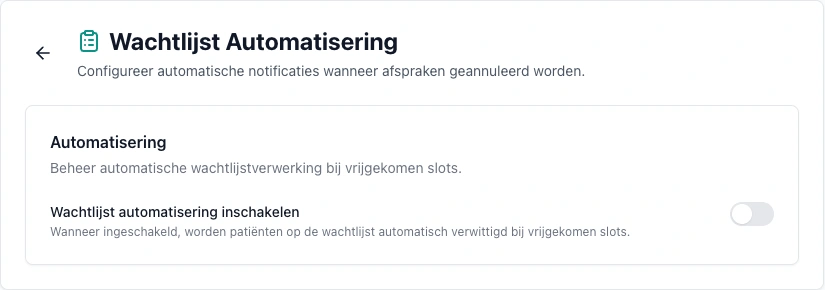
Per consultation type, set how many days ahead a free slot must be available. If none is available, the patient joins your waiting list online. With automation enabled, an online cancellation triggers matching and an email offer to the patients who fit.
Start 60 days free or request a demo
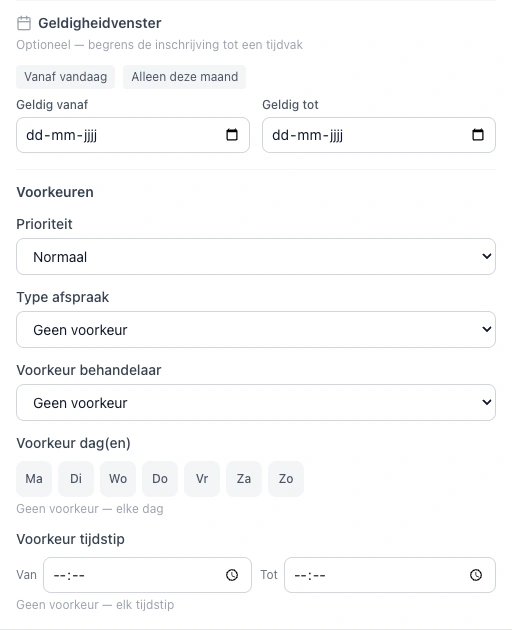
The VIMA.care waiting list is waiting list software built into the calendar, online booking and patient records of care and paramedical practices in Belgium. The practice, or the patient, adds someone to the waiting list with a consultation type, preferred practitioner, preferred days, a time window, a priority and a validity period. With automation and the waiting list check enabled, a future cancellation makes VIMA find the waiting patients who fit and sends each of them an email with a personal link. The first to confirm gets the slot: VIMA checks the slot is still free, books the appointment in the calendar and expires the other offers. The waiting list is included in VIMA, which costs €30 per month excl. VAT for the first practitioner, with a 60 day free trial.

- Waiting list per consultation type and practitioner, with preferred days, time window, priority and notes
- Online self-signup from your booking page when no slot is free within the period you set
- Optional automation: on a cancellation, every matching patient gets an email with a personal link
- First to confirm gets the slot; VIMA books it and expires the other offers
- Offers can be confirmed until 2 hours before the slot, for at most 7 days
- Validity period per entry, after which the entry expires automatically
Part of VIMA.care, browser-based practice software for multidisciplinary care and paramedical practices in Belgium. Works on web, iPad, smartphone, Mac and Windows.
How VIMA fills a cancelled appointment from your waiting list
Waiting list software keeps track of who is waiting for an appointment and helps you refill a freed-up slot quickly. In VIMA that takes five steps, without you phoning patients.
Someone joins the waiting list
You look up an existing patient or add a new person with name, email and phone. You note the reason, the consultation type, the preferred practitioner, preferred days, a time window, the priority and, optionally, the period the entry is valid for. Patients can also sign up themselves from your online booking page.
An appointment is cancelled
When you cancel a future appointment, you tick the box to check the waiting list. When the patient cancels online, VIMA can check the waiting list automatically. You set this under Settings, Waiting list.
VIMA finds who fits
Only waiting patients for the same consultation type (or no preference), for that practitioner (or no preference), on a day that suits them, within their time window and within their validity period qualify.
Everyone who fits gets an email
Each matching patient receives an email with a personal link to confirm or decline the slot. You choose the email template VIMA uses.
The first to confirm is in your calendar
VIMA checks again that the slot and, where needed, a room are still free, creates the appointment and marks the entry as handled. The other offers for that slot expire at once.
Who gets the freed-up slot? The rules
A waiting list only works when everyone knows how it works. These are the fixed rules of the automatic waiting list in VIMA.
First to confirm
All matching patients get an email at the same time. The first to confirm gets the appointment. Priority sets the order in your overview and guides you when you fill a slot manually.
Offers do not stay open forever
An offer can be confirmed until 2 hours before the slot, for at most 7 days. If the freed-up slot starts within 2 hours, VIMA sends no offer.
No double bookings
On confirmation, VIMA checks the practitioner's calendar and room occupancy. If someone books that slot in the meantime, the open offers expire.
Declining is fine
The patient can decline an offer through the same link. By default they stay on the waiting list for a next slot.
Who gets no offer
Entries without an email address, handled or expired entries and patients whose communication has been stopped receive no automatic messages.
You stay in control
The automation is off by default. Without it, you use the waiting list manually: you see who is waiting, call or email from the list and book yourself.
Online waiting list: patients sign up themselves
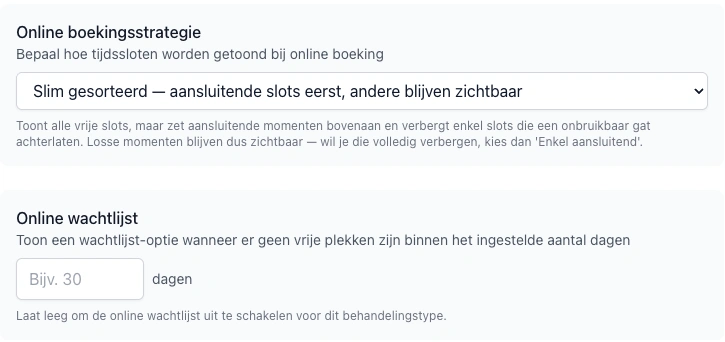
Per consultation type, set how many days ahead VIMA looks for a free slot, between 1 and 365 days. For example, 30 days: if there is no bookable slot within that period, the patient can join the waiting list from your booking page. They do not have to wait 30 days before signing up. Leave the field empty to disable the online waiting list for that consultation type.
- The patient picks the consultation type and, if you allow practitioner choice, the practitioner.
- After signing up, the patient receives a confirmation email.
- Someone already on the waiting list for the same treatment cannot sign up a second time.
- Leave the field empty and the online waiting list stays off for that consultation type.
A waiting list on paper, in a separate app or built into VIMA
There are separate waitlist apps that run next to your calendar. The difference with a waiting list inside your practice software shows mostly after the patient confirms.
| Notebook, spreadsheet or note | Separate waitlist app | VIMA (built in) | |
|---|---|---|---|
| Who fits the free slot? | Search yourself | According to the app's rules | Automatically by consultation type, practitioner, day, time window and validity |
| Notifying patients | Phone one by one | Usually SMS or WhatsApp | Email with a personal link to every matching patient |
| Appointment in the calendar | Enter it yourself | Move it yourself or through an integration | Automatically after confirmation, with a calendar and room check |
| Patient self-signup | No | Depends on the app | Yes, from your online booking page |
| Records and history | Separate from the record | Separate environment | Same patient record and calendar |
| Cost | Your own time | Separate subscription next to your practice software | Included in VIMA |
Frequently asked questions about the waiting list
What is waiting list software for a care practice?
Waiting list software keeps track of which patients are waiting for an appointment, for which treatment, with which practitioner and at which times they can come. When an appointment is cancelled, it shows or notifies the waiting patients who fit. In VIMA, the waiting list is part of the same software as your calendar, online booking and patient records.
Does VIMA fill cancelled appointments automatically?
Yes, if you turn on the waiting list automation. When a future appointment is cancelled, VIMA emails every matching patient. The first to confirm gets the appointment in your calendar. Without the automation, you use the waiting list manually.
Who gets the slot if several patients fit?
All matching patients get an email at the same time. The first to confirm gets the appointment and the other offers expire straight away. VIMA checks again on confirmation that the slot is still free.
Can patients add themselves to the waiting list?
Yes. Per consultation type, you set a period in days. If a patient finds no free slot within that period on your online booking page, they can join the waiting list and receive a confirmation email.
How long does a waiting list offer stay valid?
An offer can be confirmed until 2 hours before the slot, for at most 7 days. For a slot that starts within 2 hours, VIMA sends no offer.
Do waiting patients get an SMS or WhatsApp message?
No. Waiting list offers are sent by email with a personal link. In VIMA, SMS is an option for appointment reminders, charged per message. People without an email address you contact yourself from the waiting list.
Can I keep a waiting list per practitioner or per treatment?
Yes. For each entry you choose the consultation type and the preferred practitioner, or no preference. A freed-up slot is only offered to people who fit that type and that practitioner.
Do I need a separate waitlist app next to my practice software?
Not with VIMA. The waiting list is part of the same software as your calendar and records, so a confirmed appointment goes straight into the calendar, with no integration or second subscription.
Is the waiting list included in the price?
Yes. The waiting list is part of VIMA, which costs €30 per month excl. VAT for the first practitioner, with a 60 day free trial. Optional SMS reminders are charged per message.
Which practices is the waiting list for?
Care and paramedical practices in Belgium, such as podiatry, specialised foot care, speech therapy, dietetics and osteopathy. The waiting list follows your own consultation types, practitioners and hours.
Related features
One shared core. Shaped deeply for each discipline.
VIMA keeps one reliable core: the same calendar, records and receipts run every practice. On top of that core, the workflows are shaped per supported discipline, using feedback from the professionals who use VIMA in their daily practice.
Dedicated workflow depth is currently available for podiatry, speech therapy and specialised foot care. Dietitian practices currently use the configurable shared core for scheduling, records, forms, consultation types and payments.
Practice feedback shapes how the waiting list fits each discipline. A speech therapy practice uses preferred days and a time window so parents only get offers after school hours. A podiatry practice relies on the consultation type match, so a freed-up half hour goes to a follow-up and not to a 45 minute first consultation. Those examples are configurations, not fixed rules: each practice sets its own consultation types, practitioners and hours, and the waiting list underneath works the same way for every practice.
Try VIMA in your own practice
60 days free. All features. No credit card needed.