Start 60 days free Start 60 days free
Vimy, the AI assistant in VIMA: from consultation to report
Vimy listens during the consultation and writes the report in your own template. You review, edit and save to the patient record. And for support questions, Vimy answers day and night, with a human always within reach.
Start 60 days free or request a demo
Vimy is the AI assistant inside VIMA.care, practice management software for care and paramedical practices in Belgium. Vimy listens during the consultation (in Dutch or French), turns the conversation into a report in the practice's own templates and answers support questions day and night, grounded in the VIMA manual, with a human from the VIMA team always within reach. The practitioner asks the patient for consent at every consultation, reviews every report before it reaches the patient record, and controls retention: audio is never stored, the transcript is kept encrypted for at most 90 days or not at all. Vimy is part of every VIMA practice and runs on credits shared by the whole practice; a one-time €5 starter credit lets you try Vimy without a payment card.

Live in VIMA now. Start with €5 of free Vimy credit.
See Vimy in 36 seconds
From recording to report, plus support with a human one click away.
This is how it works in your VIMA
From consent to a report in the record: five screens, one consultation.
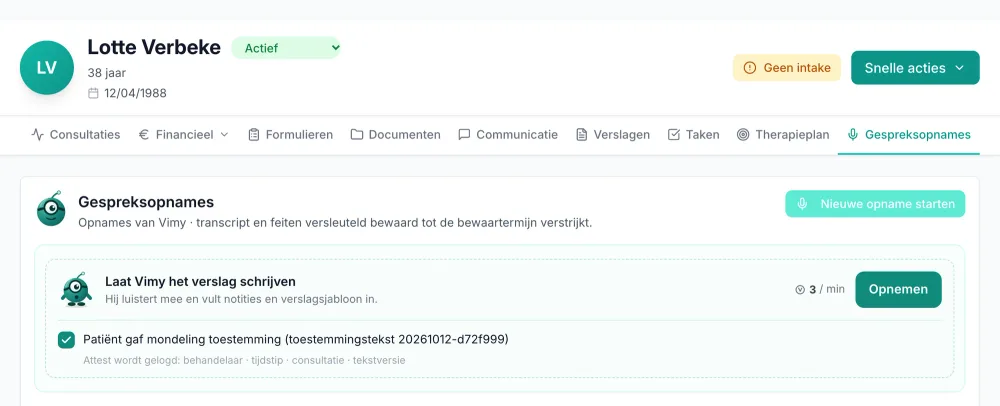
You open the record like you always do
Under recordings you tick that the patient gave oral consent; the attestation is logged right away.
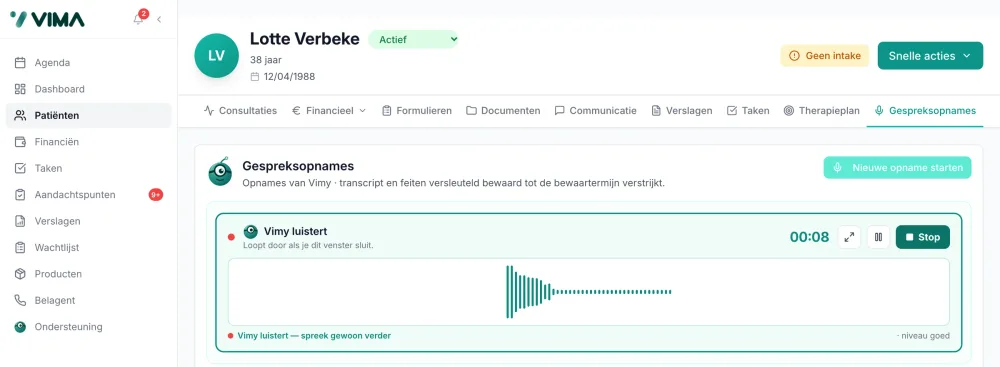
You talk to your patient, Vimy notes what matters
The record simply stays open; at the bottom the recording runs along: Vimy is listening, just keep talking.
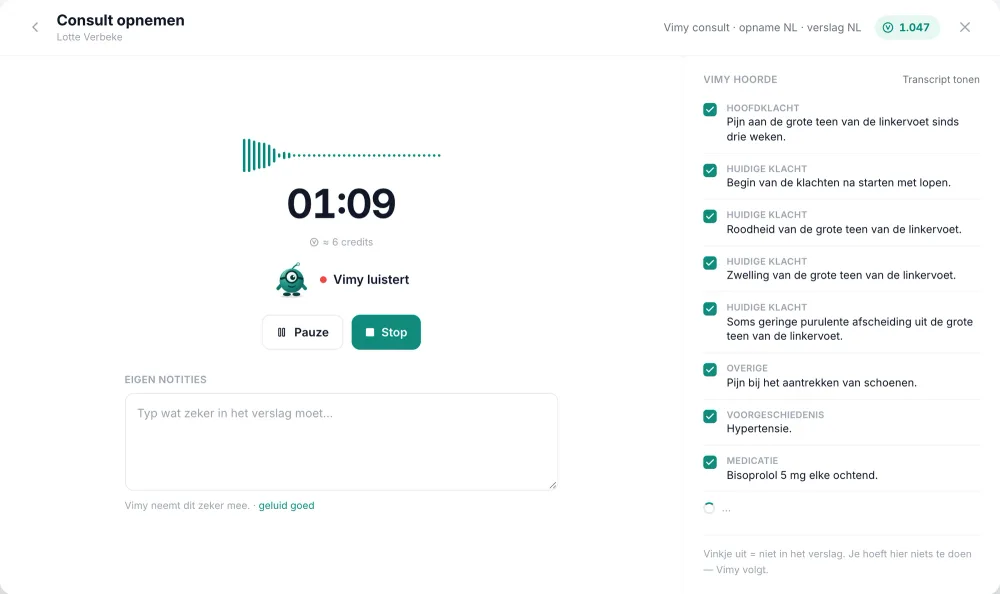
You see live what Vimy heard
Chief complaint, history, medication: every point gets a checkbox, and unticked = not in the report.
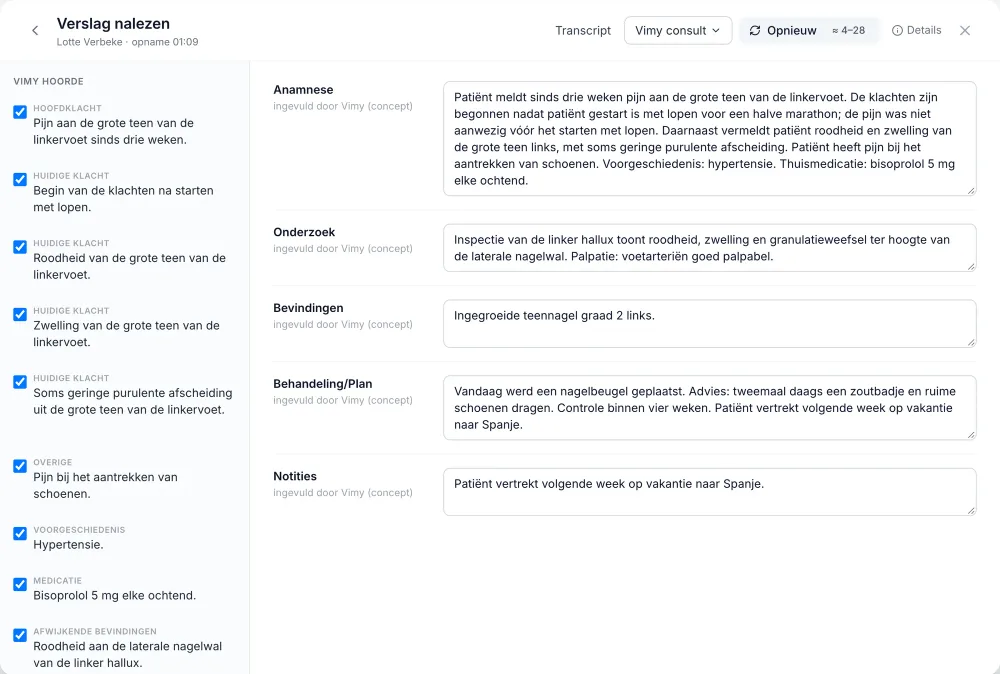
Vimy writes, you review
Every field of your template is there as a draft, filled in by Vimy: you adjust what you want or have it rewritten.
The report sits where it belongs
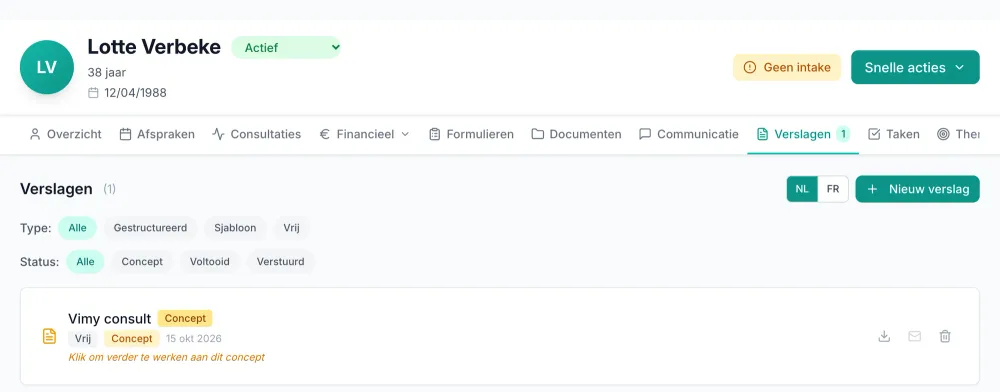
As a draft under Reports in the patient record, until you finish it. No copy-paste.
Does this sound like your evenings?
After your last patient, a second shift starts: typing reports.
Vimy listens during the consultation and turns the conversation into a report in your own template. You review, adjust where needed and save, while the consultation is still fresh.
You hit a software question at the exact moment nobody is reachable.
Vimy answers support questions immediately, evenings and weekends included, with the VIMA manual as its source. Prefer a human? One click sends your question to the VIMA team.
A separate AI scribe means copy-pasting between two tools.
Vimy lives inside VIMA. The recording starts from your appointment or consultation and the report lands straight in the patient record, in your own templates. No second subscription, no copy-paste.
What you get
Listens during the consultation
Start the recording from the appointment or consultation. You see live which points Vimy heard, and you can pause at any time.
A report in your template
The standard Vimy consultation for your discipline, your own report templates, a letter or certificate, or a free-form report. What was not discussed stays empty.
Consent, properly logged
You ask the patient for consent at every consultation and confirm with one checkbox. VIMA logs who, when, which consultation and which text version.
Privacy you configure
Audio is never stored. You keep the transcript encrypted for 7, 30 or 90 days, or not at all. Extracted facts never outlive the transcript.
Support questions, day and night
Vimy answers immediately, grounded in the VIMA manual, with its source shown and a link to the right screen in VIMA.
Prefer a human? One click.
Forward your question to the VIMA team with a summary. Vimy recognises bugs and ideas and passes them on after your confirmation.
- Vimy listens during the consultation (Dutch or French) and writes the report in your own template
- Consent per consultation, confirmed with one checkbox and logged with the text version
- You review every report: per sentence you can open the transcript fragment, everything stays a draft until you save
- Audio is never stored; the transcript is kept encrypted for 7, 30 or 90 days, or not at all, and conversation content is processed in the EU
- Support questions answered day and night, grounded in the VIMA manual, with sources and deep links
- A human stays within reach: one click forwards the conversation to the VIMA team
- Live in every VIMA practice; everyone starts with €5 free: a one-time €5 starter credit (incl. VAT) lets you try Vimy without a payment card
Part of VIMA.care, browser-based practice software for multidisciplinary care and paramedical practices in Belgium. Works on web, iPad, smartphone, Mac and Windows.
Support questions? Vimy answers first, a human stays within reach
Vimy is the 24/7 first line of VIMA support, grounded in the manual. The VIMA team reads along. This is what it looks like:
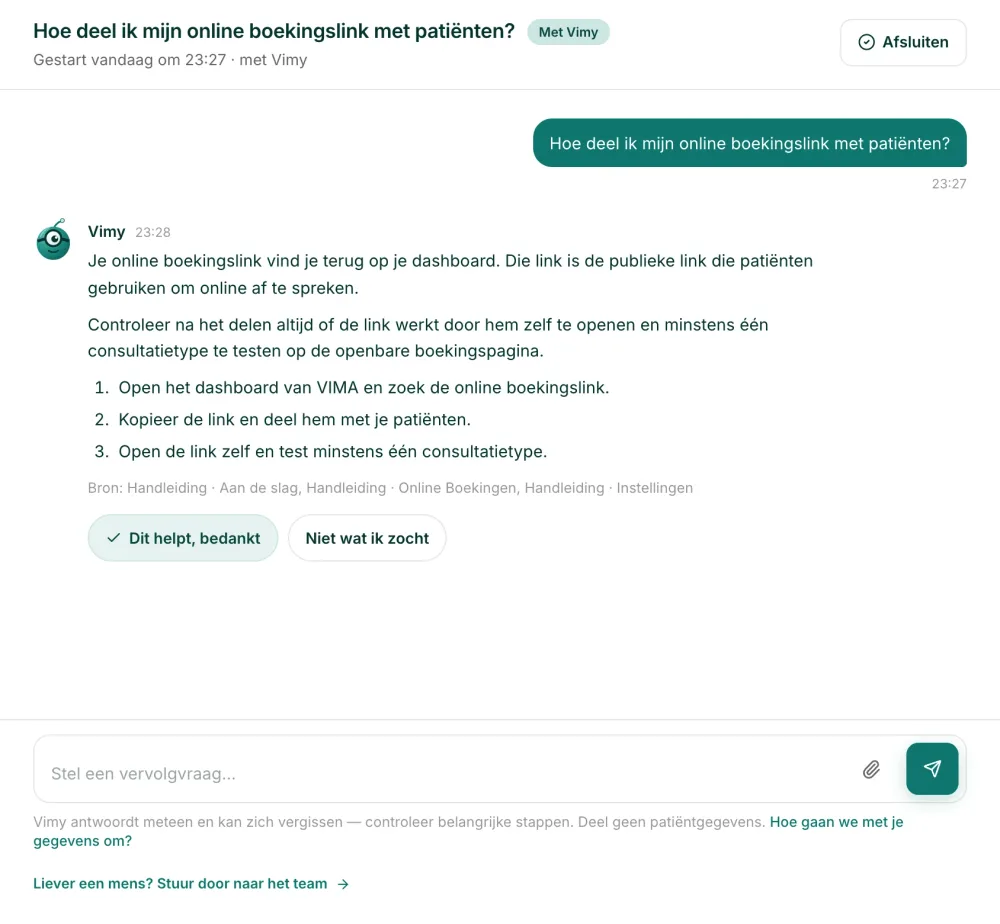
Vimy answers immediately, with sources
You ask your question whenever it comes up, evenings included; the answer arrives in steps, with the manual as its source.
Prefer a human? One click
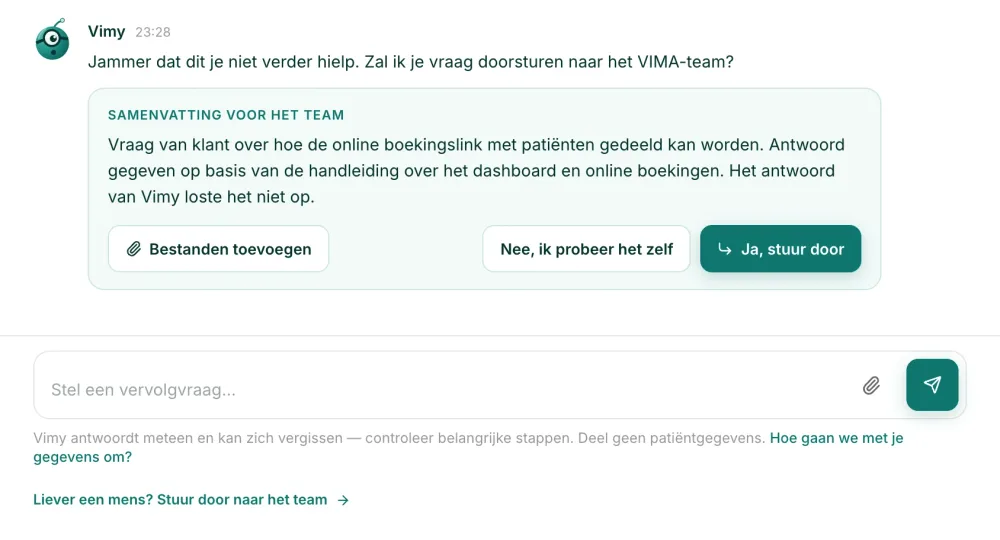
Not what you were looking for? Vimy prepares a summary for the team and you decide whether it goes.
Privacy and retention: strict and configurable
Vimy is built on a simple principle: store as little as possible, and let the practice configure what is stored.
Audio: never stored
VIMA never stores audio. At the specialised medical AI processor (a sub-processor of VIMA) it exists at most during the recording and is wiped right after you stop. Re-listening does not exist; the transcript is the source.
Transcript: encrypted and configurable
You choose the retention period yourself: do not keep, 7, 30 or 90 days. After the period the transcript is wiped and no new document can be generated from it.
Facts never outlive the transcript
The points Vimy heard are stored encrypted in VIMA and never kept longer than the transcript. If you choose not to keep the transcript, only a short 2 hour writing window remains.
Processing in the EU
Conversation content is processed in the EU. Before Vimy can be switched on, a practice administrator accepts the Vimy addendum with the processing terms.
Patient rights
The patient record export includes the Vimy data. An administrator erases all Vimy data of a patient in one action, and permanently deleting a patient erases it too.
An audit log without content
Every setting change and recording event is written to an audit log. That log never contains transcript or audio content.
What you deliberately save stays in the patient record: the report, filled-in fields and your own notes, under your practice's record retention policy.
What Vimy does not do
An AI colleague deserves clear limits. Vimy deliberately does not:
- Vimy makes no diagnoses and gives no treatment advice. The report is your report: you review, you decide, you stay responsible.
- Vimy invents nothing. A section nothing was said about during the consultation stays empty.
- Vimy never records on its own. Without patient consent, confirmed per consultation, no recording starts.
- Vimy changes nothing in your practice settings. For support questions it explains and links to the right screen; you make the change.
- Vimy does not replace your own judgement. It answers immediately and can be wrong: verify important steps.
- Vimy does not replace the VIMA team. Humans stay reachable, for every practice.
Availability and price
How Vimy pricing works:
Included in every VIMA practice
Vimy is part of VIMA. Switch it on under Settings › Vimy and you can start recording right away.
Everyone starts with €5 free
Every practitioner activates a one-time €5 of credits (incl. VAT). No payment card needed, and nothing is ever charged automatically. That covers about 2 hours of recording, or roughly 5 twenty-minute consultations including the report.
Credits shared by the practice
Recordings and reports use credits from one shared practice balance. Credits never expire. You buy bundles in the app, where the price per credit is shown before you pay.
VIMA itself: 60 days free
VIMA costs €30 per month excl. VAT for the first practitioner and €25 per month excl. VAT per extra practitioner, with a 60 day free trial and no credit card. The Vimy interface works in Dutch and French.
Frequently asked questions about Vimy
What is Vimy?
Vimy is the AI assistant inside VIMA, practice management software for care and paramedical practices in Belgium. It does two things: it listens during the consultation and writes the report in your own template, and it answers support questions about VIMA day and night, grounded in the manual. Vimy is part of every VIMA practice.
How does Vimy turn a consultation into a report?
You start the recording from the appointment or consultation. Vimy listens and extracts the points that were discussed. After you stop, you pick a template and Vimy writes the report section by section. You review, edit and save it to the patient record.
Does the patient need to consent to the recording?
Yes. You ask the patient for consent out loud at every consultation and confirm it with one checkbox before the recording starts. VIMA logs who, when, which consultation and which version of the consent text, and keeps that log as long as the patient record.
Is the audio of the conversation stored?
No. VIMA never stores audio. At the medical AI processor the audio exists at most during the recording and is wiped right after you stop. The transcript is the source, and you choose its retention: do not keep, 7, 30 or 90 days, stored encrypted.
Do I stay responsible for the report?
Yes, and Vimy is built that way. Vimy invents nothing: a section nothing was said about stays empty. You can open the transcript fragment per sentence, everything is editable and the report stays a draft until you save it. Vimy makes no diagnoses and gives no treatment advice.
Which languages does Vimy support?
Recording works in Dutch and French; you pick the language before the recording starts, there is no automatic detection. The report language is a separate choice, so a French consultation with a Dutch report also works. The Vimy interface itself is available in Dutch and French.
Does Vimy work with my own report templates?
Yes. Vimy fills in the standard Vimy consultation for your discipline, or your own report templates, letters and certificates. Per consultation type you link a default template; without a template the main points go to your notes.
What does Vimy cost?
Vimy runs on credits shared by the whole practice; they never expire. The price per credit is shown in the app before you buy a bundle. A one-time €5 starter credit (incl. VAT) lets you try Vimy without a payment card. VIMA itself costs €30 per month excl. VAT for the first practitioner, with a 60 day free trial.
Does Vimy answer support questions outside office hours?
Yes, that is the 24/7 first line: Vimy answers immediately, at any hour, grounded in the VIMA manual and with its sources shown. The VIMA team reads along, and forwarding to a human is always one click away.
What if Vimy does not know the answer?
Then Vimy itself proposes to forward your question to the VIMA team, with a summary attached. It also recognises bugs and ideas and passes them on after your confirmation. The VIMA team reads along and replies in the same conversation.
How does Vimy handle GDPR and patient data?
Vimy is built on data minimisation and control: no audio storage, encrypted transcripts with a configurable retention period, conversation content processed in the EU, consent per consultation with a log, and patient rights such as export and one-action erasure. Before activation your practice accepts the Vimy addendum with the processing terms. The assessment as controller stays with your practice.
Is Vimy a separate AI scribe?
No. Vimy lives inside your practice software: the recording starts from your calendar or consultation, the report lands straight in the patient record, and credits, permissions and settings are managed in VIMA. No second tool, no copy-paste.
Related features
One shared core. Shaped deeply for each discipline.
VIMA keeps one reliable core: the same calendar, records and receipts run every practice. On top of that core, the workflows are shaped per supported discipline, using feedback from the professionals who use VIMA in their daily practice.
Dedicated workflow depth is currently available for podiatry, speech therapy and specialised foot care. Dietitian practices currently use the configurable shared core for scheduling, records, forms, consultation types and payments.
Vimy writes in the templates of your discipline: a podiatrist gets a different report than a speech therapist. Recording, review and privacy stay the same shared core.
Try VIMA in your own practice
60 days free. All features. No credit card needed.